
Free tool
UTM Builder — With Validation, Not Just Concatenation
Most UTM builders just paste your text into a query string. This one checks it first — catching uppercase letters, invalid characters, and missing parameters, the exact mistakes that cause GA4 to show "(unassigned)" traffic or split one campaign into three rows in your reports. Free, no signup required.
Why validation matters more than the URL itself
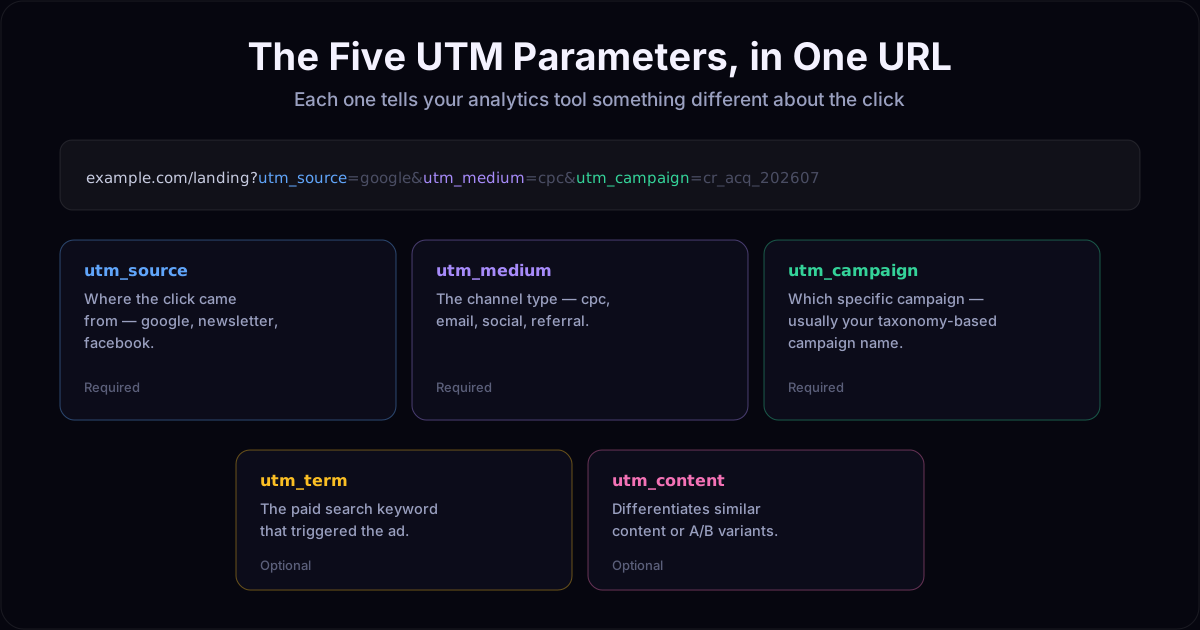
Building a UTM link is trivial — it's five key-value pairs appended to a URL. The actual problem teams run into is consistency: one person types Facebook, another types facebook, a third uses FB. Analytics platforms treat all three as different sources. The result is fragmented reporting, duplicate rows, and traffic that lands in an unexplainable "(unassigned)" bucket — not because tracking is broken, but because the UTMs feeding it were never consistent to begin with.
This builder runs the same validation engine used inside UseTaxonomy: it flags case issues and disallowed characters as you type, before the link ever gets shared or launched.
Free builder vs. governed taxonomy
This page covers generic UTM syntax — valid characters, consistent casing, required fields. That's enough to stop the most common tracking mistakes. What it doesn't do is enforce your team's specific rules: which values are actually allowed for utm_source on your account, what your campaign naming convention looks like, or which client a link belongs to. That's what an account adds — the same governed dictionaries and naming rules used across campaign taxonomy and GTM tag naming, applied to UTMs too.
UTM builder: frequently asked questions
Is this UTM builder actually free?
Yes. Building a UTM link and validating it runs entirely free, with no signup or account required. You only need an account for extras like link shortening, saving campaigns to a governed taxonomy, or enforcing naming rules across a team.
How is this different from Google's free Campaign URL Builder?
Google's builder concatenates whatever you type — it does not check for mistakes. This tool validates as you type: it flags uppercase letters (analytics tools treat UTMs case-sensitively), characters outside the safe set, and missing required parameters, so you catch the errors that cause broken tracking before you ever launch the link.
Why does UTM case sensitivity matter?
GA4 and most analytics platforms treat "Facebook" and "facebook" as two different sources. Mixed-case UTMs are one of the most common causes of traffic getting split across duplicate rows in reports, or landing in an "(unassigned)" channel that no one can explain. This tool flags case issues immediately, before the link goes live.
What UTM parameters does it support?
All five standard parameters: utm_source, utm_medium and utm_campaign (required), plus utm_content and utm_term (optional) for A/B variants and paid search keywords.
What happens when I click "Shorten & save to your taxonomy"?
That takes you to sign up. Once you have an account, the same link can be shortened, saved under a client workspace, and validated against your team's actual naming rules and dictionaries — not just generic UTM syntax, but your organization's specific allowed values.
Can I use this for Google Ads, Meta Ads, or any URL?
Yes — this builder works with any destination URL and any platform. UseTaxonomy also has a Chrome extension that validates names directly inside the Google Ads and Meta Ads interfaces at the point of campaign creation, if you want validation earlier in the workflow.
Does this store or track the URLs I build?
No. The free builder runs the validation logic in your browser — nothing is sent to a server or saved unless you sign in and explicitly save a campaign.
Enforce this across your whole team
Save campaigns, validate against your own naming rules, and govern UTMs per client.
Create your accountSee UTM Taxonomy →