
GTM Audit Tool
Audit and Rename Your Google Tag Manager Container
GTM lets anyone name a tag anything — which is exactly how containers turn into a mess of orphan tags, duplicate events, and hardcoded IDs no one remembers the reason for. UseTaxonomy audits your container, flags what is broken, and previews a clean rename before you touch anything live.
Why GTM containers drift out of control
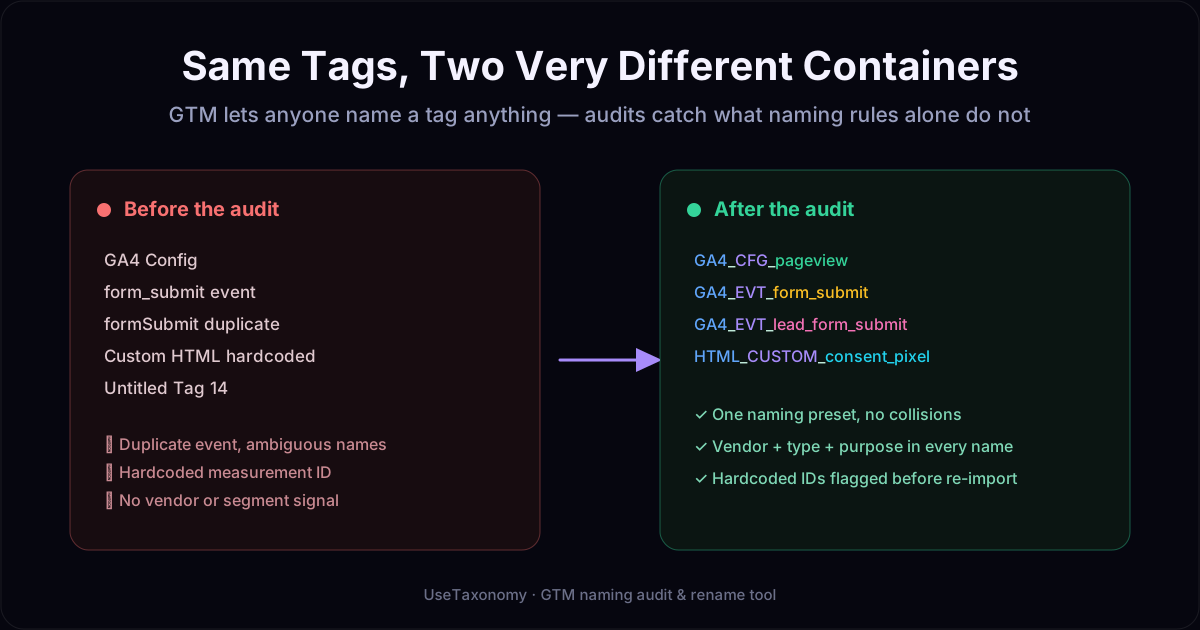
Tag Manager has no naming rules of its own. Over time, a container accumulates tags named by whoever set them up, however they typed it that day. Common failure modes include:
- Orphan tags with no firing trigger, left over from paused campaigns
- Duplicate or near-duplicate event names that fragment reporting
- Hardcoded measurement IDs and pixel IDs instead of reusable variables
- No consistent way to tell a tag's vendor, type, or purpose from its name
- Naming collisions once two people update the container independently
These issues do not stop data from collecting — they stop your team from trusting or safely maintaining what is collecting it.
How the GTM audit works
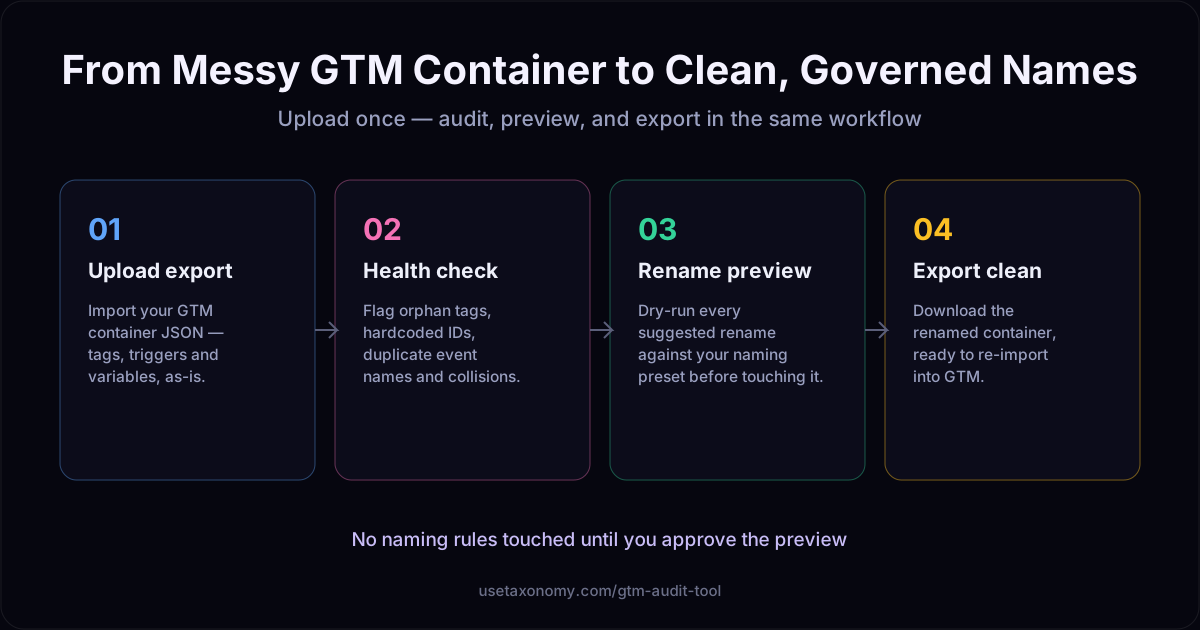
1. Upload
Import your GTM container export (JSON) — no changes to your live workspace.
2. Health check
See orphan tags, duplicate events, hardcoded IDs, and naming collisions in one view.
3. Rename preview
Preview a renamed tag, trigger, and variable set against your naming preset — a dry run.
4. Export
Download the renamed container and re-import it into GTM when you are ready.
A naming preset you control
The rename engine is not a fixed formula. You define the separator, the segments used per element type, and character limits — seeded from a recommended preset so you are not starting from a blank page. The same discipline that governs your campaign taxonomy extends to the tag management layer.
Who this is for
- Marketing ops or analytics teams inheriting a container built by multiple people over years
- Agencies taking over tracking for a new client and needing to understand what is actually firing
- Teams migrating to GA4 or a new measurement plan who want a clean naming baseline first
- Anyone who has opened a GTM container and found "Untitled Tag 14"
GTM audit: frequently asked questions
What is a GTM naming audit?
A GTM naming audit reviews every tag, trigger, and variable in a Google Tag Manager container against a set of naming and health rules — flagging inconsistent names, duplicate event names, orphan tags with no firing trigger, hardcoded IDs that should be variables, and other issues that make a container hard to maintain.
How does UseTaxonomy audit a GTM container?
You export your GTM container as JSON and upload it. UseTaxonomy parses the tags, triggers, and variables, runs a health check for common issues, and suggests a renamed version of the container based on a naming preset you control (separator, prefixes per tag type, character limits).
What issues does the health check catch?
It flags orphan tags (no firing trigger), duplicate or near-duplicate event names, hardcoded measurement IDs or pixel IDs that should be variables, and naming collisions where two elements would resolve to the same name under your convention.
Will it change my live GTM container automatically?
No. The rename is a preview — a dry run you can review, filter, and adjust before exporting. You then re-import the renamed container into GTM yourself, so nothing changes in your live workspace without your review.
Can I customize the naming preset?
Yes. You control the separator, the segments used per tag/trigger/variable type, and the character limits. UseTaxonomy ships with a recommended preset, seeded from your existing campaign taxonomy, that you can adjust to match how your team already names things.
Does this replace manually cleaning up GTM?
It replaces the most time-consuming, error-prone part: finding every inconsistency by hand across dozens or hundreds of tags. You still review and approve the result — the tool does the discovery and the bulk rename, not the judgment calls.
Does GTM naming affect anything outside of GTM?
Consistent tag and trigger names make it faster to diagnose tracking issues, onboard new team members, and hand off a container between agencies or in-house teams. They do not affect data collection itself, but they directly affect how quickly your team can trust and maintain what is firing.
How is this different from a general campaign taxonomy?
A campaign taxonomy governs campaign, ad set, and ad names in your advertising platforms. A GTM audit applies the same governance discipline — controlled values, validation, a consistent naming preset — to the tag management layer, which most naming-convention tools do not touch.
Stop guessing what a tag actually does
Upload your GTM export, see the issues, and preview a clean rename in one workflow.
Audit your GTM containerSee AI Taxonomy Fixer →