
Campaign Taxonomy
Campaign Taxonomy Software for Clean, Consistent Marketing Data
Define what your campaigns need to measure, standardize how every name is built, and validate compliance before inconsistent data reaches your reports. UseTaxonomy turns documented naming rules into an enforced standard your marketing teams actually follow.
What is a campaign taxonomy?
A campaign taxonomy is a structured classification system that defines the marketing dimensions captured in campaign names, tracking parameters, and reporting data. It establishes the allowed values for each dimension, so every campaign can be classified, compared, and analyzed the same way.
Common dimensions a campaign taxonomy can capture include:
- Country or region
- Channel
- Platform
- Objective
- Product
- Audience
- Funnel stage
- Campaign type
- Business unit
- Reporting period
A campaign taxonomy is broader than a UTM builder or a naming cheat-sheet: it is the shared vocabulary that makes your campaign data consistent across teams, platforms, and dashboards. It pairs naturally with a media taxonomy and UTM taxonomy.
Campaign taxonomy vs. naming convention vs. campaign name
These terms are often used interchangeably, but they describe four distinct layers. Keeping them separate is what makes a taxonomy maintainable.
1. Campaign taxonomy
Defines what needs to be measured — the dimensions and their allowed values.
2. Naming convention
Defines how those dimensions are formatted — order, separators, abbreviations, capitalization, and permitted values.
3. Campaign name
The final value produced by applying the taxonomy and the naming convention together.
4. Governance
Controls who can create or change values, validates execution, and measures compliance over time.
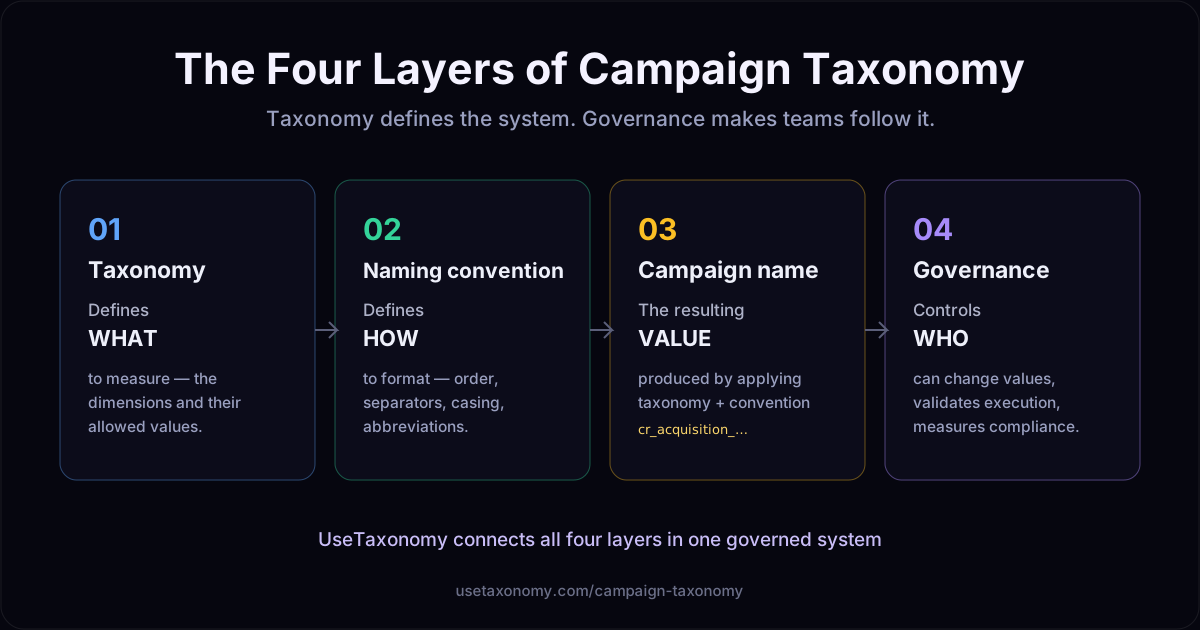
Campaign taxonomy defines the system. UseTaxonomy makes sure your team follows it.
How campaign taxonomy works in practice
Suppose a taxonomy defines the fields Country → Objective → Channel → Product → Audience → Platform → Period, with a naming convention of lowercase values, an underscore separator, and a fixed field order. Applying both produces a single, parseable campaign name:
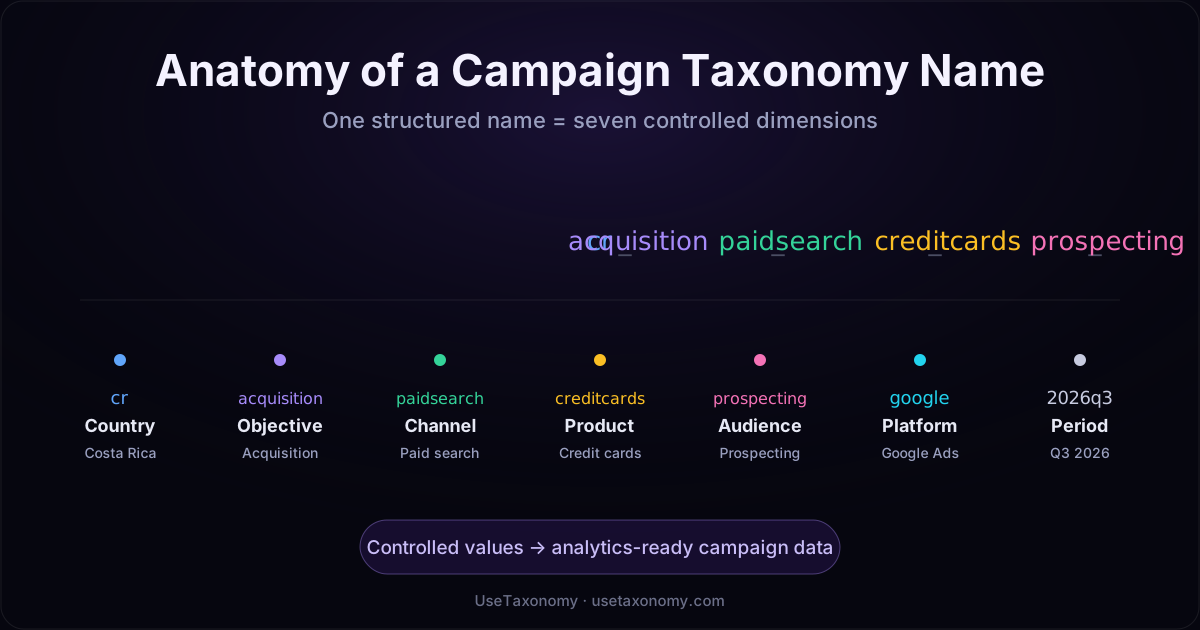
Each segment carries a controlled dimension:
Country
cr — Costa Rica
Objective
acquisition — New-customer acquisition
Channel
paidsearch — Paid search
Product
creditcards — Credit cards
Audience
prospecting — Cold / non-customers
Platform
google — Google Ads
Period
2026q3 — Q3 2026
Because every value comes from a controlled list, this structured name turns campaign metadata into dimensions that can be classified, compared, and analyzed — instead of free text a report has to guess at.
What happens without a governed campaign taxonomy?
Without a shared, enforced taxonomy, the same initiative gets named four different ways:
cr_google_cards_q3 credit-card-search-costa-rica CR_ACQ_SEM_TDC_2026Q3 campaign_cards_finalThese values may all describe similar credit-card campaigns, but analytics and advertising platforms treat them as unrelated strings. Inconsistency at the point of naming cascades into:
- Fragmented reporting
- Duplicate dimensions for the same concept
- Unreliable campaign grouping
- Recurring manual data normalization
- Harder cross-market comparisons
- Reduced trust in dashboards
- Messier historical data preparation
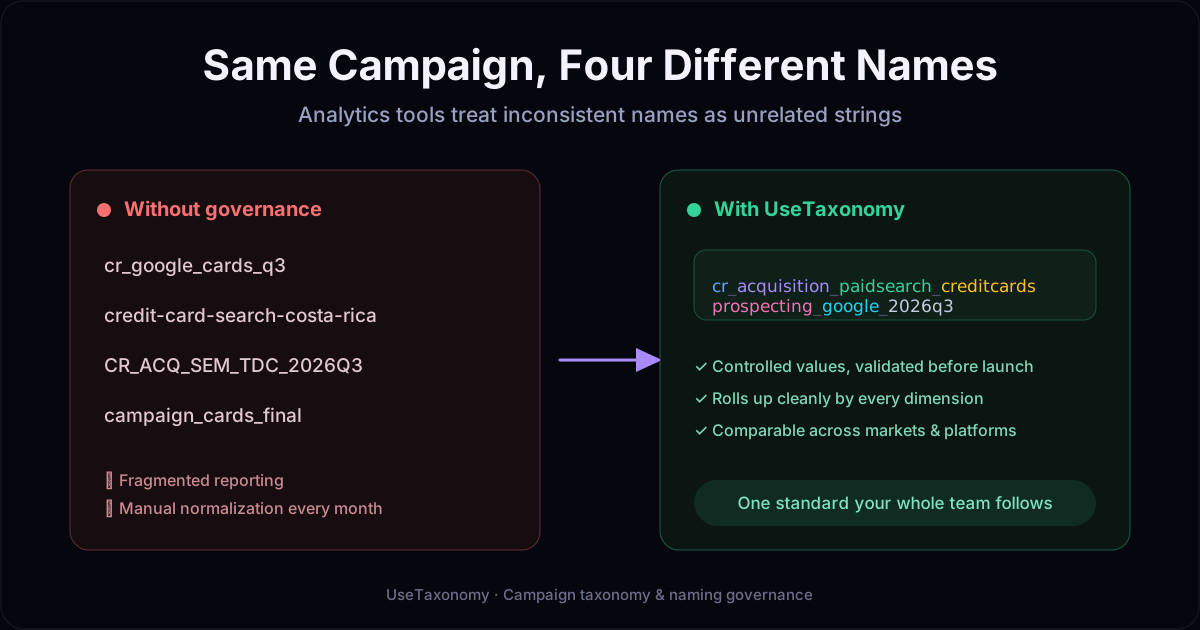
A taxonomy improves the consistency of your inputs. It does not, on its own, guarantee perfect attribution — but it removes the largest, most avoidable source of dirty marketing data.
A spreadsheet documents the rules. UseTaxonomy enforces them.
Most teams start with a spreadsheet of naming standards. It is a useful reference, but a document cannot consistently prevent:
- Unapproved abbreviations
- Incorrect field order
- Missing required dimensions
- New, uncontrolled values
- Formatting differences
- Invalid campaign names reaching production
- Different versions of the taxonomy being used at the same time
UseTaxonomy moves the standard from a document into the workflow, with capabilities that enforce it as campaigns are created:
- Controlled value dictionaries for each dimension
- Required and optional fields per structure
- Client- and market-specific taxonomies in isolated workspaces
- Real-time validation as names are built
- Bulk CSV validation for existing campaigns
- Google Ads classification from a connected account (read-only, OAuth)
- Roles and approval workflows for changes to the taxonomy
- Compliance reporting by client, platform, and person
- Audit history and version traceability
From campaign taxonomy to enforced governance
1. Define
Select the dimensions the organization needs to measure.
2. Standardize
Establish permitted values, field order, and formatting rules.
3. Validate
Check campaign names before or after launch — live, in bulk, or from Google Ads.
4. Govern
Manage permissions, approvals, compliance, and how the taxonomy evolves.
This is the operational layer most teams are missing. See how it extends into taxonomy governance and marketing data governance.
Turn campaign naming rules into analytics-ready data
A governed campaign taxonomy can help your team:
- Reduce recurring manual normalization
- Create comparable campaign dimensions
- Improve dashboard consistency
- Support regional and multi-client reporting
- Strengthen campaign auditability
- Improve data preparation for attribution analysis
- Create more consistent historical inputs for Marketing Mix Modeling
- Give AI-assisted campaign workflows a controlled vocabulary and structure
When should you use campaign taxonomy software?
Campaign taxonomy software earns its place when:
- Multiple teams or agencies create campaigns
- Marketing operates across countries or business units
- Naming standards currently live in spreadsheets
- Reports require frequent manual cleanup
- Google Ads structures need to be classified or audited
- Taxonomy compliance must be measurable
- Campaign metadata needs approval and ownership
- Historical media data must be prepared for MMM or AI workflows
Why UseTaxonomy?
UseTaxonomy is more than a UTM builder. It connects the whole chain — from taxonomy design to analytics readiness — in one governed system:
taxonomy design → naming generation → validation → governance → compliance reporting → analytics readiness
Campaign taxonomy defines the system. UseTaxonomy makes sure your team follows it — with controlled dictionaries, real-time validation, roles and approvals, and compliance reporting that a spreadsheet simply cannot provide.
Campaign taxonomy: frequently asked questions
What is campaign taxonomy?
A campaign taxonomy is a structured classification system that defines the marketing dimensions captured in campaign names, tracking parameters, and reporting data — such as country, channel, platform, objective, product, audience, and funnel stage. It establishes the allowed values for each dimension so campaigns can be classified, compared, and analyzed consistently.
What is the difference between campaign taxonomy and a naming convention?
A campaign taxonomy defines what the organization needs to measure (the dimensions and their allowed values). A naming convention defines how those dimensions are formatted (order, separators, abbreviations, and capitalization). The campaign name is the final value produced by applying both. Governance is the layer that keeps teams following them over time.
What fields should a campaign taxonomy include?
Common dimensions include country or region, channel, platform, objective, product, audience, funnel stage, campaign type, business unit, and reporting period. The right set depends on how your organization reports — a taxonomy should capture the dimensions you actually slice dashboards and models by, and nothing you do not use.
What is a campaign taxonomy example?
With fields ordered Country → Objective → Channel → Product → Audience → Platform → Period, lowercase values, and underscore separators, a campaign name becomes cr_acquisition_paidsearch_creditcards_prospecting_google_2026q3. Each segment maps to a controlled value, so the name doubles as structured metadata for reporting.
Why are spreadsheets insufficient for campaign taxonomy governance?
A spreadsheet can document naming standards, but it cannot enforce them. It does not prevent unapproved abbreviations, wrong field order, missing required dimensions, new uncontrolled values, or invalid names reaching production — and different people often work from different versions. Governance requires validation and controlled values at the point a campaign is created.
How does campaign taxonomy improve reporting?
Reporting tools group data by campaign name and tracking values. When every campaign follows the same taxonomy, performance rolls up cleanly by channel, country, product, and objective, with less manual normalization and fewer mismatched buckets — which supports more consistent dashboards and cross-market comparisons.
Can campaign taxonomy be used across different advertising platforms?
Yes. The same taxonomy can govern campaign names and tracking across Google Ads, Meta Ads, and other channels, plus UTM parameters and GTM tag names. A shared structure is what lets you compare performance across platforms instead of treating each one as a separate silo.
How does UseTaxonomy validate campaign names?
UseTaxonomy checks names against your taxonomy rules — required fields, allowed values from controlled dictionaries, field order, separators, and formatting. Validation can happen in real time as names are built, in bulk from a CSV, or against campaigns classified from a connected Google Ads account.
How does campaign taxonomy support Marketing Mix Modeling?
Marketing Mix Modeling depends on clean, consistently classified spend and performance. A governed taxonomy helps prepare more consistent historical inputs and comparable dimensions, which reduces data-preparation effort. It supports MMM readiness; it does not by itself guarantee model accuracy or attribution.
Who owns a campaign taxonomy?
Ownership usually sits with marketing operations, analytics, or measurement teams, with input from paid media and regional leads. In practice a taxonomy needs a clear owner per market or client, defined roles for who can add or change values, and an approval and audit trail — which is what turns it from a document into a governed standard.
Build a campaign taxonomy your team can actually follow
Define it, standardize it, validate it, and measure compliance — in one place.
Build your campaign taxonomySee UTM taxonomy →